Tradie Assistant: The All-in-One AI Toolkit for the Aussie Job Site
Stop wasting your nights on paperwork and your days hunting for manuals.
Tradie Assistant is the AI co-pilot for the job site - draft client replies, sense-check installs, and wrap up admin in minutes. Built for Aussie trades to help you win more work and get home earlier.
No credit card required. Upgrade when you’re ready.
Smart Chat
Smart Chat: Your 24/7 On-Site Mate
“Draft a professional reply to this client about the delay, make it sound like me.”
It’s more than just a chat. Whether you need to brainstorm a tricky install or fire off an 8am site reminder, Smart Chat handles the comms so you look like a pro while you’re still on the tools.
Smart Assistant
Smart Assistant: The Tech Expert
“What is the minimum clearance for this install in the manual?”
Ditch the PDF scrolling. Smart Assistant references our massive library of product manuals, guides, and spec sheets to give you the exact detail you need.
Smart Vision
Smart Vision: Sight-Powered Diagnosis
📷 Snap a photo to identify parts or diagnose faults.
Stop guessing. Upload a photo of a faulty component or a complex setup. Smart Vision identifies the issue and finds a solution, saving you an hour of troubleshooting in ten seconds.
Smart Tools
Smart Tools: The Instant Office
“Generate a professional quote for a 5kW solar install with my standard T&Cs.”
One-click automation for the boring stuff. From quote generators and day logs to social media posts and review responders. Everything stays in your tone and keeps your business running while you’re off the clock.
Built for every trade
From sparkies to landscapers, we’ve got your back.
Tradie Assistant isn’t just for one trade. Whether you’re a builder, plumber, carpenter, or brickie, our tools adapt to your workflow. If you’re on the tools in Australia, this is for you.
See what Tradie Assistant can do
Answers backed by real manuals, not guesses.
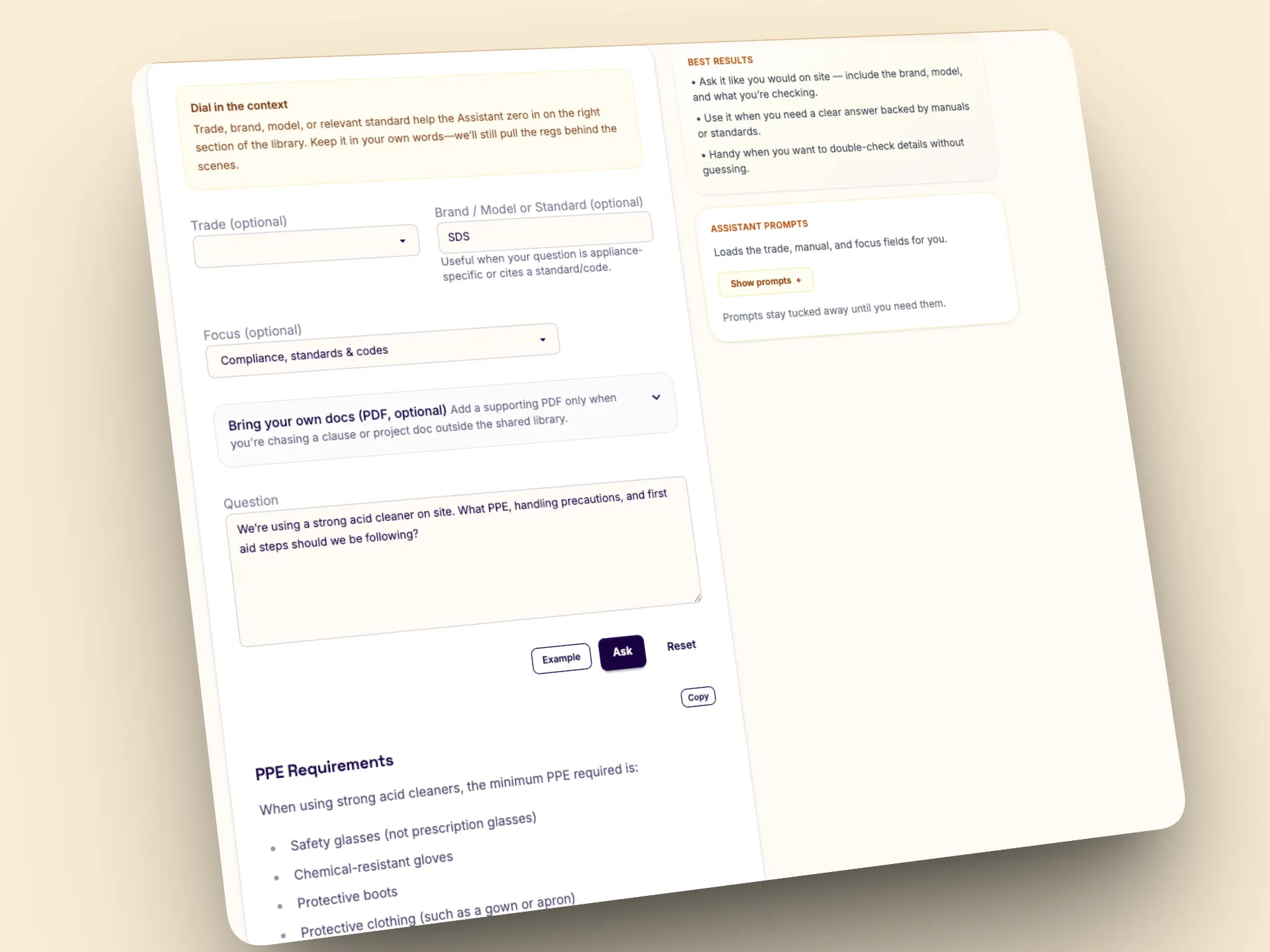
Ask a question mid-job and get a clear, specific response referenced from our library of product manuals, guides, and spec sheets. It’s the fastest way to troubleshoot installs, confirm specs, or find the right part without digging through PDFs.
Trusted by legends across the country
“It looks mint and saves me hours.”
Real stories from crews using Australian Tradie Software, Smart Vision diagnosis, and AI for Builders on live jobs.
“Quotes, T&Cs, and follow-ups are done before the boys pack up. It’s proper tradie admin automation.”
Mick • Builder
“Smart Vision picked up the likely fault from one photo. Saved a second site visit.”
Renae • Refrigeration
“The product guide answers help us troubleshoot faster and explain the fix clearly to clients.”
Sam • Sparkie
Our goal
Help every tradie get the best out of AI
We believe AI is the smartest tool you’ll ever put in your bag, but it will never replace your skills. It’s here to make you more efficient so you can get home on time.
Our mission is to give every Aussie tradie access to the same high-end tech the big players use. That’s why we have a no catch Free Tier available, so small crews can still get real value from the tools, even when usage costs add up on our side. We’d rather tradies get ahead than get left behind.
Use it like an app
Keep Tradie Assistant on your home screen
Tradie Assistant already runs like an app on your phone. Tap “Add to Home Screen” and you’ve got a one-tap shortcut ready for the next job. It takes a few seconds and works on both iPhone and Android.
iPhone (Safari)
- Open this site in Safari.
- Tap the Share icon (square with an up arrow).
- Choose “Add to Home Screen” and hit Add.
Looks and launches like an app — no App Store needed.
Android (Chrome)
- Open this site in Chrome.
- Tap the ⋮ menu in the top-right corner.
- Select “Add to Home screen” then tap Add.
If Chrome shows an Install banner, tap it and confirm.
FAQs
Straight answers for busy tradies
It’s a dedicated AI platform built specifically for Australian tradespeople. It combines general AI chat with specialised tools that understand trade manuals, product guides, and the day-to-day admin needs of a trade business.
Not at all. Only our Smart Assistant library is more Australia-focused (manuals and guides), but all other tools are country-agnostic and work anywhere. Even outside Australia, you can still get real value, and we’re expanding the library over time.
All trades. Electricians, plumbers, HVAC techs, builders, carpenters, painters, tilers, roofers, landscapers, concreters, plasterers, bricklayers, cabinetmakers, glaziers, locksmiths, flooring installers, welders, metal fabricators, and more.
Smart Chat is your general-purpose AI for conversation, brainstorming, and writing. Smart Assistant is our specialised “Expert” tool - it’s grounded in our library of manuals, product guides, and spec sheets to give technical answers that general AI can’t.
Smart Vision lets you “show” the AI a problem using your phone camera. It can identify parts, troubleshoot issues, and help diagnose faults based on visual cues.
We treat your info like it’s locked in the ute. Your prompts, outputs, and files stay private to your account — we don’t access or read them unless you explicitly share something with support or opt in to sharing an upload. When we call OpenAI to generate answers, request/response data may be retained for up to 30 days for abuse/safety checks, then deleted unless required by law. OpenAI’s API data isn’t used to train models by default. See our Privacy Policy, Terms, and OpenAI’s Privacy Policy plus Your Data for the full breakdown.
By default, uploads stay private to your account. We index them so the Assistant can pull short, relevant snippets and include them in the prompt for a targeted answer. If you tick “Share this upload to help other tradies”, you give permission to add a sanitised, read-only copy into the shared library. Only share files you have rights to upload and never include personal data. You’re responsible for how you use outputs, and we’re not liable for decisions made from uploaded content or AI answers. OpenAI may retain API logs for up to 30 days for security/abuse monitoring; that retention isn’t used for training by default.
Too easy. Go Account → Billing → Manage subscription to open your secure Stripe portal. Cancel any time; your plan stays active until the end of the current period. We don’t store card details - Stripe handles payments and is PCI DSS Level 1 compliant.
Yep. It’s a web app - use it on your phone on site, laptop in the shed, or tablet in the ute. Same login, same workspace.
AI is brilliant at speed and wording, but it’s not a licensed tradie. For anything safety-critical or manufacturer-specific, check the cited page and use your judgement.
We ship small tweaks most weeks and bigger improvements regularly. Keep an eye on the Blog for notable changes.
Yes. You can use the Smart Tools on a free account. To try Smart Chat and Smart Assistant, start a 14-day free trial - cancel any time from Billing. See the Pricing page for details.
Nope. It’s built for tradies: step-by-step screens, plain language, and job-ready outputs. Type what you need, pick a tool, done.
Tradie Assistant is built specifically for trades: structured tools, trade-focused prompts, and a library of manuals, product guides, and spec sheets so you can verify answers with citations. It’s faster to use on site, keeps your workflow in one place (quotes, proposals, reviews, troubleshooting), and is priced for everyday trade work. We’re also privacy-focused — your prompts and outputs aren’t read by us, and API data isn’t used to train OpenAI models by default.
Hit Contact or email hello@tradieassistant.app and we’ll get you sorted.
Ready to get started?
Jump in now and save the admin hours this week.